

Quick Answer
The best smart living room ideas combine adjustable lighting, convenient entertainment controls, automated curtains, organized cables, and comfortable furniture. Start with smart lighting and one useful automation, then add technology that solves an everyday problem. Choose compatible devices and keep traditional controls accessible so your living room remains comfortable, attractive, and easy for everyone to use.
A smart living room should feel like a comfortable home, not a showroom filled with gadgets. The most successful spaces use technology quietly: lights adjust to an activity, curtains close when needed, and entertainment starts without juggling several remotes.
You don’t need a complete renovation or an expensive automation system to create that experience. A few carefully chosen upgrades can make an existing room more convenient while preserving its style.
These 12 smart living room ideas explain what to change, where each upgrade works best, and how to avoid unnecessary complexity.
12 Smart Living Room Ideas That Actually Improve Daily Life
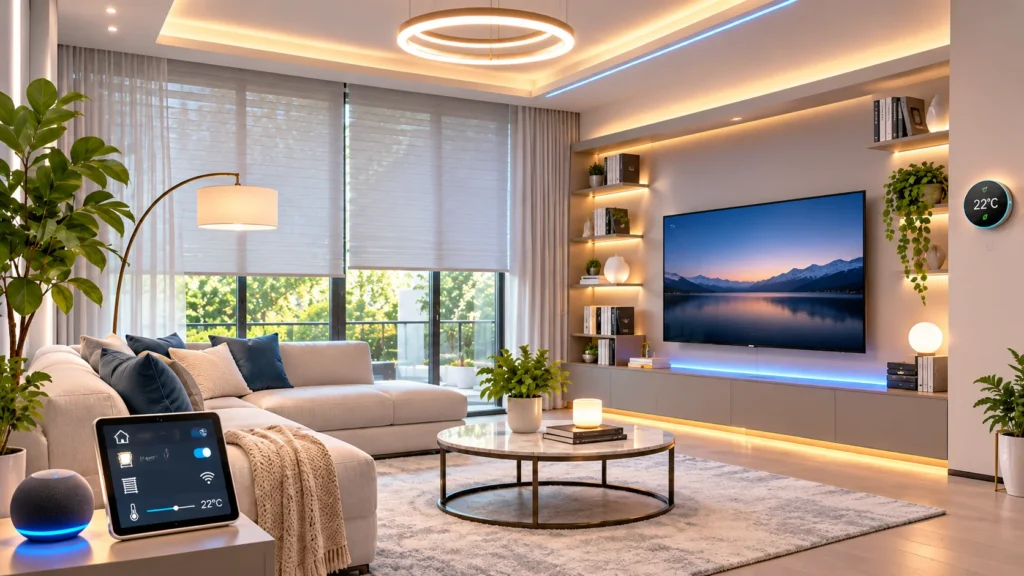
1. Use Smart Lighting to Create Different Moods
Smart lighting is one of the easiest ways to make a living room more flexible without changing its furniture or layout.
Instead of relying on a single overhead light, combine adjustable ceiling lights, table lamps, floor lamps, and subtle accent lighting. Each source can perform a different function.
- Relaxing: Use warm, dimmed lamps for a calm evening atmosphere.
- Reading: Brighten a lamp beside your favorite chair without illuminating the entire room.
- Entertaining: Use balanced lighting across seating areas so guests can see one another comfortably.
- Movie night: Reduce screen reflections with low, indirect background lighting.
Choose smart bulbs for individual lamps when you want an easy retrofit. Smart switches can be more convenient for controlling multiple ceiling fixtures, but electrical compatibility matters.
The ENERGY STAR smart lighting guidance explains how certified connected lighting can combine flexible control with energy efficiency.
For advice about fixture placement, brightness, and lighting layers, see our living room lighting guide.
2. Build a Simple Smart Entertainment Center
A smart entertainment center should make watching television, listening to music, and switching between devices easier.
Begin by organizing your television, streaming device, soundbar, and game console around how you actually use them.
Useful features include:
- A television with accessible streaming apps.
- A soundbar that supports convenient TV audio control.
- HDMI-CEC, where compatible, to simplify power and volume commands.
- A streaming interface that keeps favorite services easy to find.
- Concealed cables and accessible power connections.
Before mounting your television, check viewing distance, screen height, outlet locations, and glare from nearby windows.
Do not assume every entertainment device will cooperate automatically. HDMI-CEC behavior varies by manufacturer, and some combinations still require separate controls.
3. Add Automated Curtains or Smart Blinds
Automated window coverings let you adjust daylight, privacy, and screen glare without walking across the room.
For example, blinds can open as part of a morning routine and close before evening television viewing.
This idea is particularly useful for:
- Rooms with tall or difficult-to-reach windows.
- South- or west-facing windows that create strong afternoon glare.
- Large living rooms with several window coverings.
- Households that want convenient privacy routines.
Choose between retrofit curtain motors and complete motorized blind systems based on your existing window treatment. Check rod compatibility, weight limits, power requirements, and manual operation before purchasing.
For a softer decorative finish, pair automated shades with stationary curtains that complement the room’s color palette.
4. Use Voice Control for Everyday Convenience
Voice control can reduce the number of switches, remotes, and apps needed for routine tasks.
A compatible smart speaker or display may let you turn off lights, adjust supported blinds, or start a connected entertainment routine.
Keep commands short and intuitive. A scene called “Movie Night” is easier for family members to remember than a complicated device-specific command.
However, voice control should be an option rather than the only way to use the room. Maintain physical switches, remotes, or simple on-screen controls for guests and anyone who prefers not to speak to a device.
Consider microphone privacy settings and device placement. Avoid positioning voice assistants where they create unnecessary clutter or interfere with conversations.
5. Create a One-Tap Movie Night Scene
A movie-night scene combines several everyday adjustments into one convenient action.
Depending on device compatibility, pressing one button could dim selected lights, lower the blinds, and activate a supported entertainment setup.
Practical Tip
Start with a two-action scene: dim your lamps and close compatible shades. Test it for several evenings before adding television, sound, or other devices. Simple automations are generally easier to maintain and troubleshoot.
Create separate scenes only when they support distinct activities. For many homes, Relax, Read, Entertain, and Movie Night provide enough flexibility.
If an automation stops working, individual devices should remain usable through their normal controls.
6. Hide Technology With Smart Storage
Concealed technology helps a living room retain a polished appearance.
Use media cabinets, cable sleeves, under-desk cable trays, and furniture with integrated cable routes to reduce visible wires.
A low-profile media console can provide storage for remotes, streaming accessories, and gaming equipment while keeping the television area visually balanced.
Be careful with enclosed electronics. Routers, gaming consoles, receivers, and other heat-generating equipment need appropriate ventilation. Avoid tightly packing devices or covering ventilation openings.
Our guide on keeping a living room clutter-free offers additional ideas for organizing everyday items without overfilling the room.
7. Use Adjustable Accent Lighting Behind Furniture
Indirect LED lighting can make a living room feel more atmospheric while keeping the light source less noticeable.
Possible locations include behind a television, beneath a suitable floating cabinet, or along a shelf designed to accommodate lighting.
Choose a subtle glow rather than the brightest or most colorful effect available. Warm white or restrained accent colors often blend more naturally with everyday home decor.
For television bias lighting, a neutral white light is a practical choice if you want to avoid altering your perception of on-screen colors.
Install lighting strips according to the manufacturer’s instructions, especially where heat, adhesive surfaces, and power supplies are involved.
8. Connect Heating and Cooling to Your Routine
Smart temperature control can improve comfort when your living room experiences changing temperatures throughout the day.
Depending on your heating or cooling system, compatible controls may support schedules, remote adjustments, or occupancy-based routines.
For example, a living room that gets hot in the afternoon may benefit from coordinated window shades and temperature scheduling.
System compatibility is essential. A smart thermostat designed for one type of central heating system may not work with a mini-split air conditioner, radiator, or other equipment.
Check the equipment manufacturer’s supported control methods before purchasing an accessory.
9. Choose Furniture That Supports Technology Without Dominating the Room
A smart living room still needs comfortable seating, appropriate tables, and practical walking routes.
Furniture with built-in charging, convenient storage, or accessible outlets can support technology without turning it into the visual focus.
Consider a sofa-side table with room for a charging station, an ottoman with remote storage, or a media console that accommodates ventilation and cable management.
Before adding powered furniture, check the location of outlets and how cables will cross the room. Avoid creating tripping hazards.
For more detailed layout decisions, consult our functional living room guide.
10. Use Motion Sensors in the Right Places
Motion sensors can provide hands-free lighting in areas where movement is predictable.
A discreet sensor near an entrance or transitional walkway may activate a low-brightness light after dark.
However, whole-room motion automation can be frustrating when someone is sitting still and the lights unexpectedly turn off.
Use motion control for movement-based tasks and manual or scheduled scenes for longer activities such as reading or watching television.
Test detection range and timing before relying on an automation. Consider pets, furniture placement, and the likelihood of accidental triggers.
11. Choose Compatible Devices Before Expanding
A smart living room becomes difficult to manage when every product requires a different app and offers limited integration.
Choose your main control platform first, then check whether new devices support it.
Matter is an interoperability standard intended to help compatible smart home products work across participating ecosystems. However, support still depends on the particular device type, controller, and features.
The Connectivity Standards Alliance Matter FAQ explains how interoperability works and why devices may have different networking and controller requirements.
A Matter-compatible product is not automatically guaranteed to support every feature in every smart home platform.
Also check whether you need a hub, Thread border router, stable Wi-Fi coverage, or an internet connection for specific remote features.
12. Keep the Design Warm and Personal
The most effective smart living room designs balance digital convenience with traditional interior styling.
Use soft textiles, natural materials, framed artwork, plants, and coordinated furniture to prevent the room from feeling overly technical.
A neutral palette can make television screens, speakers, and accessories less visually intrusive. Warm wood, comfortable upholstery, and layered lighting can soften a technology-heavy room.
Instead of displaying every device, decide which pieces deserve attention and which should disappear into the background.
Which Smart Living Room Upgrades Should You Choose First?
Start with the upgrades that solve your most frequent inconvenience. The table below helps match each idea to a practical goal.
| Main Goal | Useful Upgrade | What to Check |
|---|---|---|
| Better atmosphere | Dimmable smart lighting | Bulb, dimmer, and fixture compatibility |
| Easier entertainment | Streaming and audio integration | HDMI and device control support |
| Less glare | Motorized blinds | Window dimensions and motor compatibility |
| Less clutter | Cable management and media storage | Ventilation and cable access |
| Hands-free convenience | Voice control or motion sensors | Privacy, coverage, and manual overrides |
For an existing room, lighting and cable organization are often sensible starting points because they can improve daily use without major renovation.
How Do You Set Up a Smart Living Room Step by Step?
Build the setup gradually so each change has a clear purpose and can be tested before the next one.
- Identify your daily routines. List how the room is used for watching television, reading, entertaining, working, and relaxing.
- Check the existing room. Locate outlets, switches, Wi-Fi weak spots, windows, and potential cable routes.
- Choose a control ecosystem. Confirm that your preferred platform supports the devices and features you plan to use.
- Start with lighting. Add a compatible smart bulb, switch, or lamp and establish reliable manual control.
- Create one scene. Build a simple routine and check that it works consistently.
- Improve entertainment and storage. Organize remotes, cables, and connected devices before adding more accessories.
- Expand only when useful. Add compatible blinds, sensors, or temperature controls where they offer a clear benefit.
- Review security and accessibility. Keep device firmware updated, protect accounts, and ensure everyone can operate essential controls.
How Can You Make a Small Living Room Smart Without Clutter?
In a small living room, the best smart upgrades are those that serve multiple purposes and take up little visible space.
Smart bulbs use existing fixtures. A compact streaming device can add entertainment features without a large media cabinet. Cable organizers can make an existing television area look tidier without replacing furniture.
Avoid adding displays, hubs, and decorative lighting strips merely because they are available. Each visible device should justify the space it occupies.
Choose compact furniture, maintain comfortable access to doors, and preserve useful floor space. A clear layout matters more than the number of connected devices.
What Smart Living Room Mistakes Should You Avoid?
Common problems are usually caused by compatibility gaps, complicated routines, or poor physical planning rather than a lack of technology.
- Buying devices before selecting an ecosystem: Check supported integrations before purchasing.
- Replacing every control with an app: Keep easy physical controls available.
- Overusing colored lighting: Use decorative effects selectively and retain comfortable everyday illumination.
- Ignoring Wi-Fi coverage: Test network reliability in the actual installation location.
- Cutting power to connected electronics: Avoid routines that abruptly switch off equipment needing normal shutdown or standby functions.
- Overcomplicating automation: Prefer a few dependable scenes over dozens of fragile rules.
- Neglecting security: Update software, use strong account credentials, and review device permissions.
Safety Reminder
Use smart plugs only within their stated electrical ratings and supported appliance categories. Never conceal damaged cords, overload outlets, or install mains-wired switches without appropriate electrical knowledge. If a lighting installation requires wiring changes, use a qualified electrician.
Useful Smart Home Products to Consider
If you’re planning a simple first upgrade, the following products are examples of established smart home categories. Check the current model, regional electrical requirements, and ecosystem compatibility before buying.
Affiliate disclosure: As an Amazon Associate, we earn from qualifying purchases. This does not change the price you pay.
💡 FOR AMBIENT LIGHTING
Philips Hue White Ambiance Smart Bulb
A connected white-light bulb designed for adjustable brightness and color temperature. It is worth considering for reading and relaxation scenes. Check the exact bulb version and whether your intended features require additional hardware.
🔌 FOR SIMPLE AUTOMATION
TP-Link Kasa Smart Plug Mini
A compact smart plug for controlling suitable plug-in devices, such as a basic lamp. It can be useful for straightforward schedules. Check the precise model’s connectivity, region, electrical rating, and compatibility.
Frequently Asked Questions
Can I create a smart living room without renovating?
Yes. Smart bulbs, compatible plug-in controls, streaming devices, and cable organizers can improve an existing living room without construction. Start with upgrades that use your current fixtures and furniture.
Do smart living room devices work without the internet?
Some devices support local control, but others depend on cloud services. Offline operation varies by product and feature. Check whether basic controls, schedules, and automations still work when your internet connection is unavailable.
Do I need a smart home hub?
Not always. Some Wi-Fi devices connect directly to a compatible app or controller. Others require a dedicated hub or Thread border router. Check the requirements of each device and your preferred platform.
Can I use smart lighting in a rented apartment?
Usually, plug-in lamps and compatible smart bulbs offer renter-friendly options. Avoid permanent electrical changes without permission, and confirm that any smart bulb works with the fixture and existing controls.
Are smart living room devices expensive to run?
Operating costs depend on power consumption, standby usage, and how devices are used. Efficient LED lighting may reduce lighting electricity consumption compared with older inefficient bulbs, but connected features also consume some standby power.
How can I protect my privacy in a smart living room?
Use strong account passwords, enable multifactor authentication where available, install security updates, and review microphone and camera permissions. Choose devices with clear privacy controls and disable features you do not need.
Final Thoughts
A smart living room works best when technology improves comfort without making ordinary tasks more complicated. Adjustable lighting, convenient entertainment controls, organized cables, and a few practical scenes often make a bigger difference than filling the room with connected gadgets.
Start with one improvement you will use every day. Test it, keep the room easy for everyone to operate, and add compatible features only when they provide a clear benefit. The result can be a living room that feels modern, welcoming, and genuinely useful.