

Quick Answer
The best work-from-home living room ideas combine a practical desk area with comfortable seating, good lighting, organized storage, and decor that matches the rest of the room. Use an empty corner, wall-mounted desk, console table, or discreet cabinet workstation to create a dedicated work zone without sacrificing your living room’s comfort.
Working from home doesn’t mean you need an entire spare room for an office. With thoughtful furniture placement and a few smart decorating choices, your living room can become a comfortable place to work while remaining a welcoming space for relaxing and entertaining.
The challenge is balancing two different purposes. Your workspace needs enough room for a desk, computer, lighting, and everyday supplies, while your living room should still feel open, attractive, and comfortable.
These 15 work-from-home living room ideas show how to combine both functions. Whether you live in a small apartment or have a spacious family room, you can find a layout that suits your available space and daily routine.
15 Work-from-Home Living Room Ideas to Transform Your Space
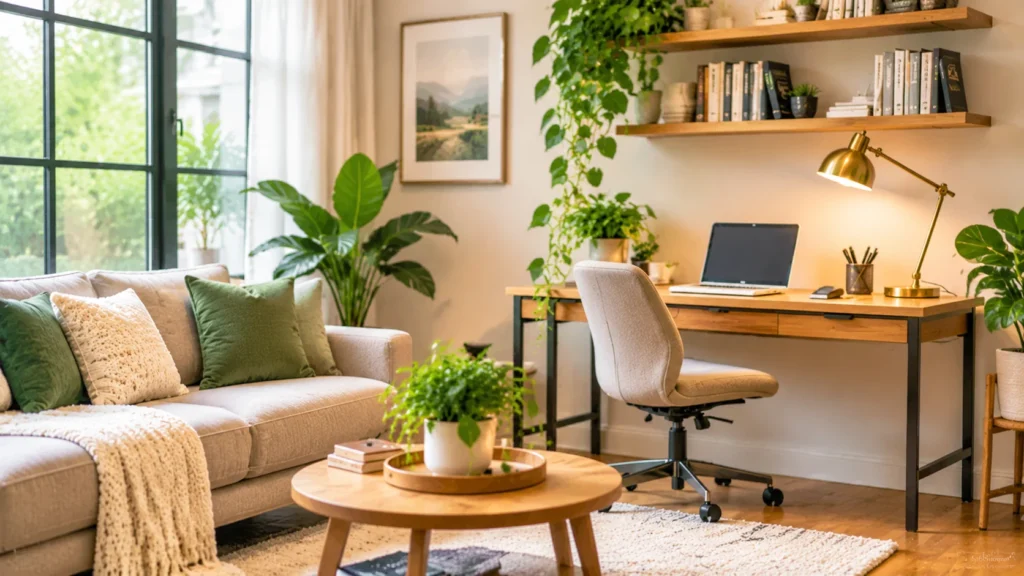
1. Create a Dedicated Workspace in an Empty Corner
An unused living room corner can become a practical home office without changing the entire furniture arrangement. Place a compact desk against one wall and add a comfortable chair that fits underneath when you’re finished working.
Use the vertical wall space for a few floating shelves. They provide room for notebooks, small storage boxes, and decorative accessories without taking up valuable floor space.
Choose a desk finish that complements your existing furniture. Natural wood works well with warm interiors, while white or black finishes suit contemporary living rooms.
2. Place a Slim Desk Behind the Sofa
If your sofa sits away from the wall, the space behind it can accommodate a narrow desk or console-style workstation. This arrangement uses an area that might otherwise remain empty.
Choose a desk with enough depth for your laptop, keyboard, and essential accessories. Keep the chair compact so it doesn’t interfere with the main walking path.
This layout works particularly well in open-plan living rooms where you want to separate work and relaxation without installing a physical divider.
3. Install a Wall-Mounted Floating Desk
A floating desk is an excellent option when floor space is limited. Because it attaches directly to the wall, it eliminates bulky legs and can make a small living room feel less crowded.
Install it at a comfortable working height and choose a model with enough surface area for your everyday equipment. Add wall-mounted shelves above it for additional storage.
For a cohesive appearance, match the desk color with your wall, shelving, or other living room furniture.
4. Hide Your Home Office Inside a Cabinet
A cabinet workstation is a clever solution if you don’t want your computer and office supplies visible throughout the day. Choose a cabinet with a fold-down or pull-out desk surface and enough internal storage for your essentials.
When work is finished, close the doors to conceal the equipment and restore the living room’s decorative appearance.
This arrangement is especially useful in multipurpose family rooms where the workspace needs to disappear during evenings or weekends.
5. Use a Bookshelf to Separate the Work Area
An open bookshelf can divide your living room into separate activity zones without completely blocking natural light. Position it between the desk and seating area to create a subtle boundary.
Use the shelves for books, decorative baskets, plants, and a few personal accessories. Avoid filling every section, as an overloaded bookshelf can make the room feel visually heavy.
For safety, secure tall or freestanding shelving units according to the manufacturer’s instructions, particularly in homes with children or pets.
6. Position Your Desk Near a Window
Natural daylight can make a workspace feel more pleasant and visually connected to the rest of the home. Place your desk near a window where you can enjoy daylight without creating distracting screen reflections.
Position your monitor perpendicular to the window when possible. Add curtains or blinds so you can adjust incoming sunlight throughout the day.
A small plant or simple desk lamp can complete the arrangement without making the workspace feel cluttered.
7. Match Your Desk With the Living Room Furniture
A home office feels more integrated when its furniture shares visual details with the rest of the room. Instead of choosing a desk that looks completely different, repeat materials, finishes, or colors already present in your living space.
For example, pair a light oak desk with a wooden coffee table or use a black metal desk frame that complements existing shelving and lighting fixtures.
Matching doesn’t mean every piece needs to look identical. A consistent material palette is often enough to make the entire room feel coordinated.
8. Use an Area Rug to Define Your Office Zone
An area rug can visually separate your workstation from the main seating area. Place a small rug beneath the desk and chair to establish a clear boundary without adding another piece of furniture.
Choose a low-pile design that allows your chair to move comfortably. A rug with colors that appear elsewhere in the living room will help connect the two areas.
If the desk is close to the sofa, keep the rug size and pattern relatively simple so the room doesn’t feel divided into too many competing sections.
9. Add Vertical Storage Above Your Desk
When a living room has limited floor space, use the wall above your desk to store everyday supplies. Floating shelves, narrow bookcases, and wall organizers can hold notebooks, documents, and small accessories.
Keep frequently used items within easy reach and store less frequently needed belongings higher up. Use matching boxes or baskets to conceal small items that would otherwise create visual clutter.
Leave enough open wall space to prevent the workstation from feeling cramped or overwhelming.
10. Choose a Compact and Comfortable Office Chair
Your chair should support regular work rather than simply match your living room decor. A stylish dining chair might look attractive, but it may not provide enough support for several hours of computer work.
Look for adjustable seating, suitable back support, and a height that allows your feet to rest comfortably on the floor. Make sure the chair fits beneath the desk when it isn’t being used.
For a balanced appearance, choose upholstery and finishes that coordinate with your sofa, curtains, or other furniture.
11. Use a Folding Desk for a Flexible Workspace
A folding desk gives you a temporary workstation without permanently occupying valuable living room space. It can be opened when you need to work and folded away when the room returns to its usual purpose.
This option is particularly useful for studio apartments, shared living spaces, and homes where the desk isn’t needed every day.
Choose a stable design with a suitable working surface. Check its weight capacity and locking mechanism before placing a computer or other equipment on it.
12. Create a Coordinated Background for Video Meetings
If you regularly attend video calls, think about what appears behind you. A tidy wall, attractive bookshelf, or carefully arranged collection of artwork can create a professional-looking background.
Position your desk so that the camera faces a relatively uncluttered part of the room. Avoid placing bright windows directly behind you, as they can make your face appear too dark on camera.
A small lamp, a few books, and one or two decorative objects can add personality without distracting from the meeting.
13. Add Plants for a Softer Workspace
Indoor plants can help a home office feel more connected to the rest of your living room. Place a small plant on your desk, position a larger one beside the workstation, or use a shelf to display a few varieties.
Choose plants according to the available daylight and the amount of care you can provide. If the workspace receives limited natural light, select plants suited to those conditions rather than placing sun-loving varieties in a dark corner.
Keep leaves and containers away from electrical equipment and areas where they could interfere with everyday movement.
14. Use Layered Lighting for Work and Relaxation
One ceiling light may not provide the right atmosphere for both working and relaxing. Create a more flexible arrangement with ambient lighting, a focused desk lamp, and softer accent lighting around the seating area.
A desk lamp should illuminate your work surface without shining directly into your eyes or reflecting on your computer screen. Floor lamps and table lamps can provide a more relaxed atmosphere when you finish working.
Use adjustable curtains or blinds to manage daylight and reduce glare during brighter parts of the day.
15. Create a Workspace That Disappears After Work
One of the biggest challenges of working in your living room is allowing office equipment to take over your relaxation space. Create a simple end-of-day routine that makes it easy to switch between work and home life.
Store notebooks in a drawer, place cables in an organizer, return small accessories to a container, and close your laptop. If you use a folding desk or cabinet workstation, put it away when practical.
Switch off the focused task lighting and use softer lamps around the sofa. These small changes help the room feel like a living space again instead of an office that never closes.
How Do You Set Up a Home Office in a Small Living Room?
You can create a functional home office in a small living room by choosing one compact workstation, using vertical storage, and protecting the main walking paths. The goal is to use available space efficiently rather than adding too much furniture.
Start with these practical steps:
- Measure the available area: Check the width and depth of the space before selecting a desk or chair.
- Choose one workstation location: An empty corner, wall section, or area behind the sofa can work well.
- Use vertical storage: Install shelves or wall organizers instead of adding another large cabinet.
- Choose multifunctional furniture: Folding desks, storage ottomans, and compact cabinets can support multiple purposes.
- Keep the floor open: Avoid unnecessary furniture that blocks movement between the entrance, sofa, and other areas.
For additional layout guidance, explore our living room layout ideas and consider how your workstation can fit into the existing furniture arrangement.
How Can You Make Your Living Room Workspace Comfortable?
A comfortable workspace needs more than attractive furniture. Desk height, chair support, monitor placement, lighting, and access to everyday supplies all influence how practical the setup feels.
Pay Attention to Desk and Chair Height
Adjust your chair and desk so your shoulders remain relaxed and your elbows stay comfortably close to your body while typing. Your feet should be supported rather than hanging freely.
Position Your Monitor Correctly
Keep your monitor directly in front of you and at a comfortable viewing distance. The OSHA computer monitor guidance recommends a viewing distance of approximately 20 to 40 inches (50 to 100 cm), with the top of the screen at or slightly below eye level.
Reduce Screen Glare
Position the monitor at a right angle to windows where possible. Use curtains, blinds, or adjustable task lighting to reduce reflections that make the screen difficult to see.
The OSHA workstation environment guidance also explains how lighting and glare can affect visual comfort.
What Should You Avoid When Designing a Living Room Home Office?
A poorly planned workstation can make your living room uncomfortable even when the furniture looks attractive. Avoid these common mistakes:
- Choosing appearance over comfort: Don’t use unsuitable seating simply because it matches the sofa.
- Blocking natural pathways: Keep the route between the entrance, seating, and other important areas clear.
- Ignoring cable management: Loose cables create visual clutter and can become tripping hazards.
- Overfilling shelves: Too many decorative items and office supplies make a small workspace feel crowded.
- Ignoring lighting: A poorly positioned monitor or lamp can create distracting reflections.
- Leaving work equipment everywhere: Give office supplies a dedicated storage location so they don’t spread throughout the room.
How Can You Keep Your Living Room Looking Stylish and Organized?
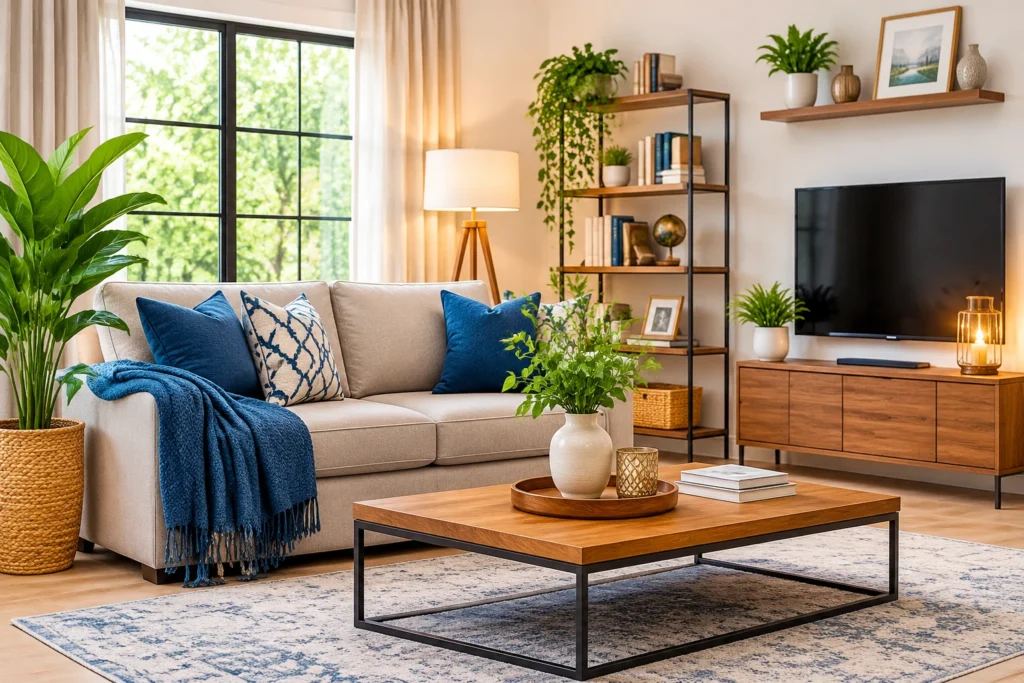
The easiest way to maintain a stylish living room office is to create a consistent visual design and a simple storage routine. Your workspace should look like a natural part of the room rather than a collection of office equipment added at the last minute.
Use these finishing touches:
- Repeat two or three colors across your desk, cushions, rug, and artwork.
- Use baskets or closed cabinets for paperwork and small accessories.
- Choose decorative objects that don’t take up valuable working space.
- Keep chargers and cables organized with clips or cable boxes.
- Use a desk mat to visually define the working surface.
- Clear your desk at the end of each workday.
For more practical organization ideas, see our guide to living room storage ideas. You can also explore our living room design basics guide for additional help balancing layout, furniture, lighting, and decor.
Frequently Asked Questions
1. Can you work from home comfortably in a living room?
Yes. A living room can support regular remote work if you create a dedicated workstation with a suitable desk, supportive chair, adequate lighting, and organized storage. A quiet corner or separated work zone can also help reduce household distractions.
2. Where should I put a desk in my living room?
Good locations include an unused corner, the space behind a sofa, a wall near a window, or an alcove. Choose an area that provides enough room for your chair and equipment without blocking doors or walking paths.
3. How do I create a home office in a small living room?
Use a compact or wall-mounted desk, vertical shelves, and multifunctional furniture. Keep the workstation against an available wall and choose storage that uses vertical space rather than taking up additional floor area.
4. How can I hide my home office in a living room?
You can hide a workstation inside a cabinet, use a folding desk, or install a decorative screen or curtain to separate it from the seating area. Closed storage also helps conceal office supplies and computer accessories after work.
5. What furniture do I need for a living room home office?
The essentials are a suitable desk, a comfortable supportive chair, and storage for everyday supplies. Depending on your work requirements, you may also need a monitor stand, desk lamp, cable organizer, and shelves.
6. How do I separate work and relaxation in the same living room?
Create a clearly defined work zone with a desk, rug, or bookshelf divider. At the end of the day, put away office supplies, close your laptop, and switch to softer living room lighting to make the transition easier.
Final Thoughts
Creating a productive home office doesn’t require sacrificing your living room’s comfort or appearance. With the right furniture placement, suitable lighting, practical storage, and a coordinated design, you can create a workspace that fits naturally into your home.
Start with one available corner or wall, choose furniture that supports your daily work, and keep office supplies organized. Most importantly, create a simple routine for putting work away when the day ends.
A well-designed living room workspace should make working easier during the day and allow your home to feel like home again afterward.